الأتمتة
أتمتة عمليات أعمال تصمد أمام التشغيل الحقيقي
أتمتة بمستوى الإنتاج لسير العمل الذي تعتمد عليه عملياتكم فعليًا، مبنية لتستمر في العمل يوم تنقطع استجابة أحد الأنظمة، أو يغيب حقل، أو تحتاج خطوة إلى تدخل بشري.
ليس كل سير عمل يحتاج برمجيات مخصصة. حيث تكفي المنصات الموجودة لديكم أصلًا، نبني عليها.
- المُشغِّلطلب · نموذج · بريد · ويب هوك
- التحقّقمدخلات مُنمَّطة · حقول مطلوبة
- القرارتوجيه بالقاعدة · منطق العمل
- التنفيذالكتابة في نظام السجلّات
- التأكّدتأكيد النتيجة المتوقَّعة
فشل عابر، أُعيدت محاولة التنفيذ مع تباعد زمني. لم يتطلّب الأمر أي تدخّل بشري.
ما زال دون حل، يُوجَّه إلى قائمة بشرية، ويعود عند التأكّد.
- 09:41:02قُبِل التشغيل من الويب هوك+0s
- 09:41:02تم التحقّق من الحمولة مقابل المخطّط+0s
- 09:41:04انتهت مهلة التنفيذ، جُدولت إعادة المحاولة+2s
- 09:41:11نجحت إعادة المحاولة · كُتب السجلّ+9s
- 09:41:12تم تأكيد النتيجة · أُغلق التشغيل+10s
توضيحي، ليست بيانات عميل. معرّفات التشغيل والأوقات وسطور السجل مُصطنعة.
نبني على المنصات التي تشغّلونها بالفعل.
الأتمتة ليست «اربط تطبيقين واترك الأمر للحظ». هي سير عمل يستمر يوم يفشل شيء ما، وتُختار المنصة بعد فهم ذلك السير، لا قبله.
منصات نبني عليها ونشغّلها
- n8n
- Make
- Zapier
- Power Automate
- Copilot Studio
- واجهات API مخصّصة
- Webhooks
- Databases
- AI models
تُختار التقنية بعد فهم سير العمل. حيث تغطي رخصة موجودة المهمة، فتلك هي التوصية.

سبع خطوات، وثلاث منها عن ما يحدث عندما يتعطل.
سير عمل يعمل فقط على المسار السعيد هو عرض تجريبي. هذه الخطوات تحوّله إلى شيء يمكن للعمليات الاعتماد عليه.

اكتشاف
ارسموا المحفّز والنتيجة والمالكين والقيود.
تصميم
عرّفوا الحالة والقواعد وحركة البيانات ومسارات الاستثناء.
بناء
نفّذوا أصغر سير عمل يمكن تشغيله في الإنتاج.
معالجة الفشل
إعادة المحاولة والتحقق والتصعيد البشري ومسار آمن للرجوع.
مراقبة
سجلات وتنبيهات وإنتاجية ورؤية للفشل.
توثيق
الملكية والاعتمادات ودفاتر التشغيل والتسليم.
دعم
ثبّتوا أولًا، ووسّعوا فقط عندما يُبرَّر ذلك.
معالجة الفشل
- إعادة محاولة مع تراجع تدريجي عند الفشل العابر، فلا يضيع طلب بسبب مهلة.
- تحقق عند الحدود، فتُرفض البيانات السيئة قبل أن تتحرك.
- تصعيد بشري إلى طابور مسمّى عندما يبقى الشرط دون حل.
- حالة رجوع آمنة، يتوقف التشغيل بنظافة بدل أن يكتمل نصفًا.
تشغيل يفشل بأمان يمكن استئنافه. تشغيل يفشل بصمت لا يمكن.
مراقبة
- سجلات منظّمة لكل تشغيل، مع المدخلات التي أنتجت النتيجة.
- تنبيه عند الفشل وعند الصمت، سير عمل توقّف عن الإطلاق فشل أيضًا.
- رؤية للإنتاجية والمدة، فيُلاحظ التدهور قبل الشكاوى.
- سجل بما صُعّد وإلى من وكيف حُلّ.
الملكية والاعتمادات ودفاتر التشغيل تُسلَّم كتابةً عند الإطلاق.
ما تبدأ الفرق عادةً بأتمتته.
هذه سير عمل يتبيّن غالبًا أنها تنسيق لا حكم، وهذا بالضبط ما تجيده الأتمتة.

الموافقات
وجّهوا وذكّروا وسجّلوا القرار بدل مطاردته بالبريد.
الإشعارات
أخبروا المالك الصحيح لحظة تغيّر الحالة، لا في نهاية اليوم.
توجيه الطلبات
أرسلوا كل طلب إلى النظام أو الفرع أو المعالج الصحيح وفق قاعدة.
حركة البيانات
انقلوا السجلات بين الأنظمة دون إعادة إدخال يدوية.
تهيئة العملاء
سلسلوا الفحوصات والمستندات وإعداد الحساب كتشغيل واحد.
معالجة المستندات
التقطوا وتحققوا وأرشفوا المستندات الواردة على سجل.
تقارير متكررة
اجمعوا ووزّعوا وفق جدول، من مصدر الحقيقة.
مزامنة CRM / ERP
أبقوا الجانبين محدّثين، بنظام واحد يملك كل حقل.
الجدولة
احجزوا وأكّدوا وأعيدوا الجدولة دون دورة تقويم يدوية.
المتابعات
طاردوا ما هو معلّق حتى يُغلق، ثم توقّفوا.
لا نؤتمت من أجل الأتمتة.
بعض الخطوات ينبغي أن تبقى بشرية. وبعض المشكلات مشكلات عملية لا برمجية. قول ذلك مبكرًا أرخص لكم من اكتشافه بعد البناء.

أتمتوا عندما
- يمكن كتابة القاعدة
- إن قرر شخصان الأمر بالطريقة نفسها، فهي قاعدة.
- يتكرر بما يكفي ليهم
- حجم حقيقي، أو موعد نهائي يتكرّر تفويته.
- البيانات موجودة أصلًا في مكان ما
- نظام يحملها؛ وشخص ينقلها فقط.
- الفشل قابل للاكتشاف
- توجد طريقة لمعرفة إن نجحت الخطوة فعلًا.
اتركوها بشرية عندما
- الخطوة حكم لا قواعد
- تفاوض واستثناءات وعلاقات وقرارات تجارية.
- تكلفة الخطأ مرتفعة
- أفضل أن يراجعها شخص من أن تعيد الآلة المحاولة.
- المشكلة في العملية نفسها
- أتمتة تسلسل مكسور تجعله يفشل أسرع فقط.
- لا أحد يملك النتيجة
- بلا مالك لا يوجد من يُصعَّد إليه النظام.
حيث يكون الجواب الصادق «أصلحوا العملية» أو «لا برمجيات جديدة»، فذلك ما ستقوله المراجعة.
أتمتة تعمل في الإنتاج، لا في عرض تجريبي.
موصوفة كبنى معمارية لا كحسابات مسمّاة. ما يهم هنا ليس من شغّلها، بل كيف تتصرف عندما تفشل خطوة.

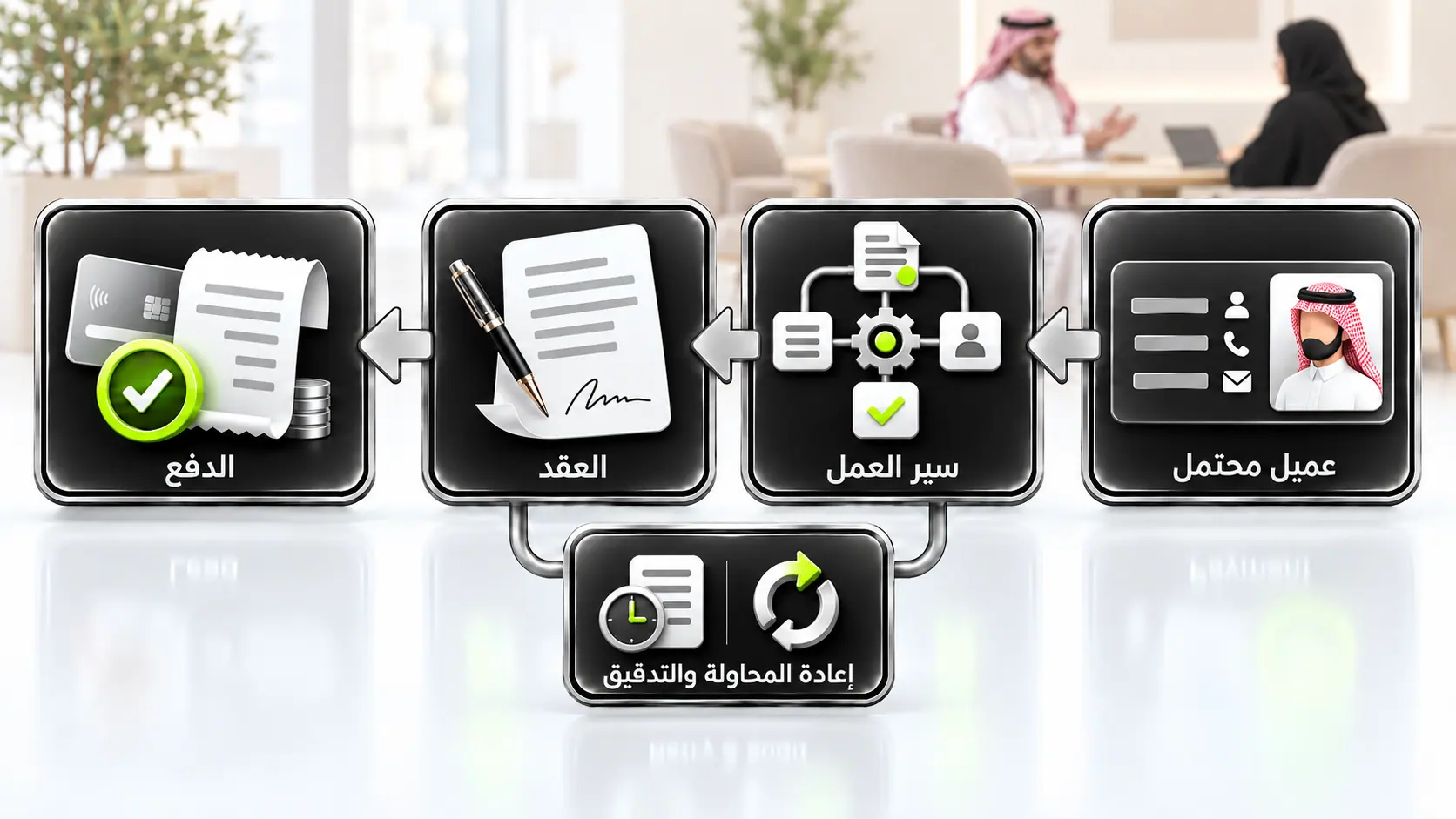
من العميل المحتمل إلى التحصيل عبر أربع منصات
خط أنابيب تجاري موصول عبر CRM وطبقة تنسيق وتوقيع إلكتروني ومدفوعات. كل مرحلة عديمة الأثر المكرر، تعيد المحاولة عند الفشل العابر، وتُصعَّد إلى مالك مسمّى عندما يتعطل مستند أو دفعة.
- HubSpot
- n8n
- DocuSign
- Stripe
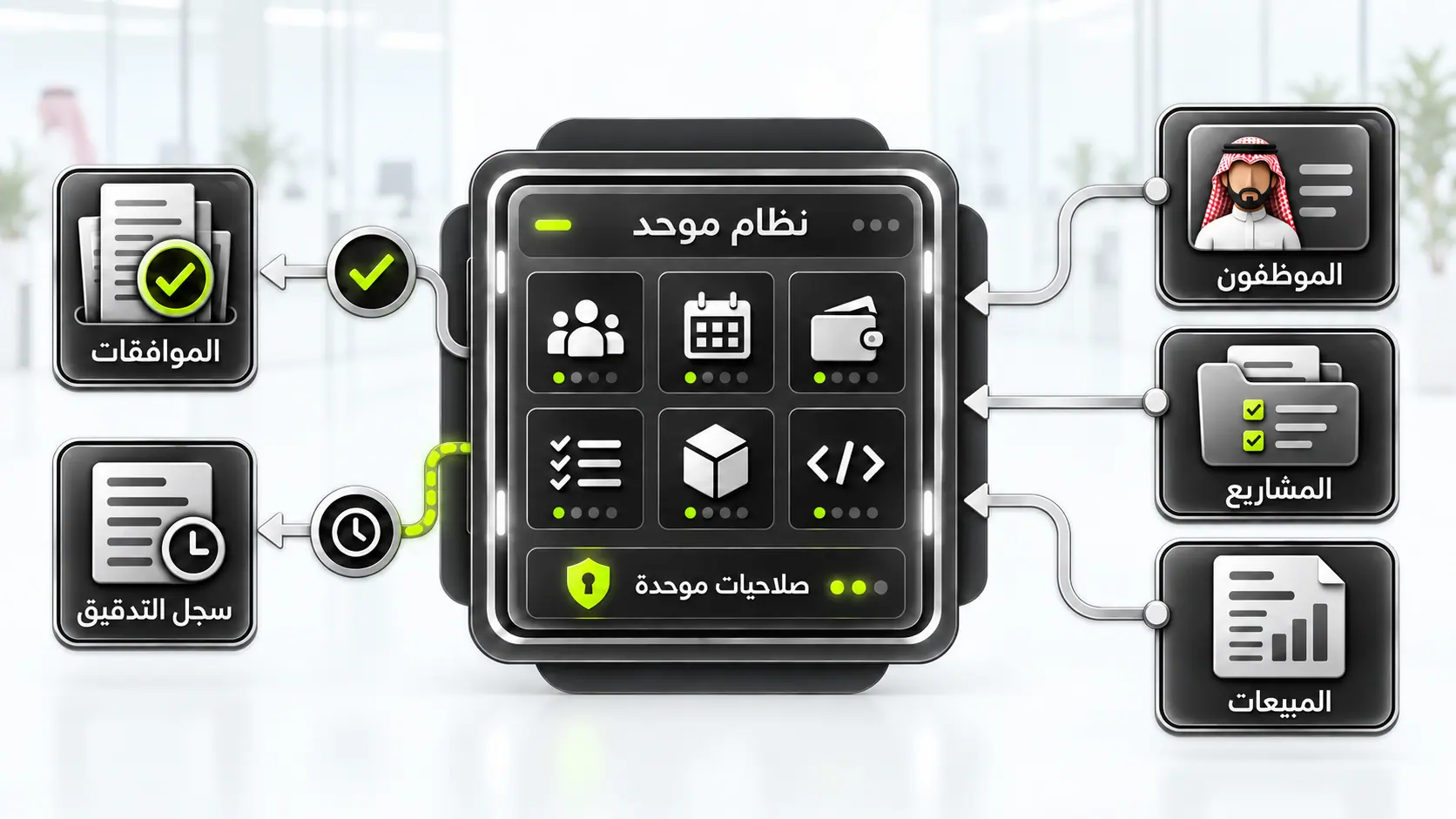
نظام تشغيل شركة Octacer نفسها
النظام الذي تشغّل عليه Octacer نفسها: أتمتة مضمّنة بجوار السجلات التشغيلية التي تتصرف عليها، مع سجل تدقيق وصلاحيات تُطبَّق على الإجراءات الآلية كما على البشرية.
- منصة داخلية
- أتمتة مضمّنة
- سجل تدقيق


أتمتة العمليات في السعودية
إجابات مباشرة حول أتمتة العمليات لفرق الخليج والسعودية.
أتمتة العمليات مسار إنتاجي: محفّز → قرار → إجراء → مالك → تحقق عبر CRM وWhatsApp والجداول والأنظمة الداخلية، مع مراقبة وتصعيد، لا ربط تطبيقات بلا ملكية.

أحضروا سير عمل واحدًا يتوقف عن العمل باستمرار.
سنرسمه مع الأتمتة محدّدة مسبقًا كاحتمال مرجّح، ونبقي التوصية مفتوحة. قد يتبيّن أنه تكامل أو ذكاء اصطناعي أو تغيير عملية أو لا برمجيات جديدة إطلاقًا.